
|



A year ago, there were barely any guides or video tutorials for Claude.
Today it’s the opposite. You open Google and find dozens of guides and Claude video courses. You watch ten minutes of one, feel a little lost, and close the tab.
A week later, you’re exactly where you started.
I’ve been there, so I did the digging for you. I went through more than 20 free courses and threw out the noise. Then I sorted what’s left by the way you actually like to learn.
Here are the best Claude courses.
If you like step-by-step guides
If you’re the kind of person who likes to read, follow along, and do it yourself at your own pace, this one’s for you.
The course is split in 3 levels, so you don’t drown trying to learn everything at once. Think of it like a video game: you finish level 1 before you unlock level 2.
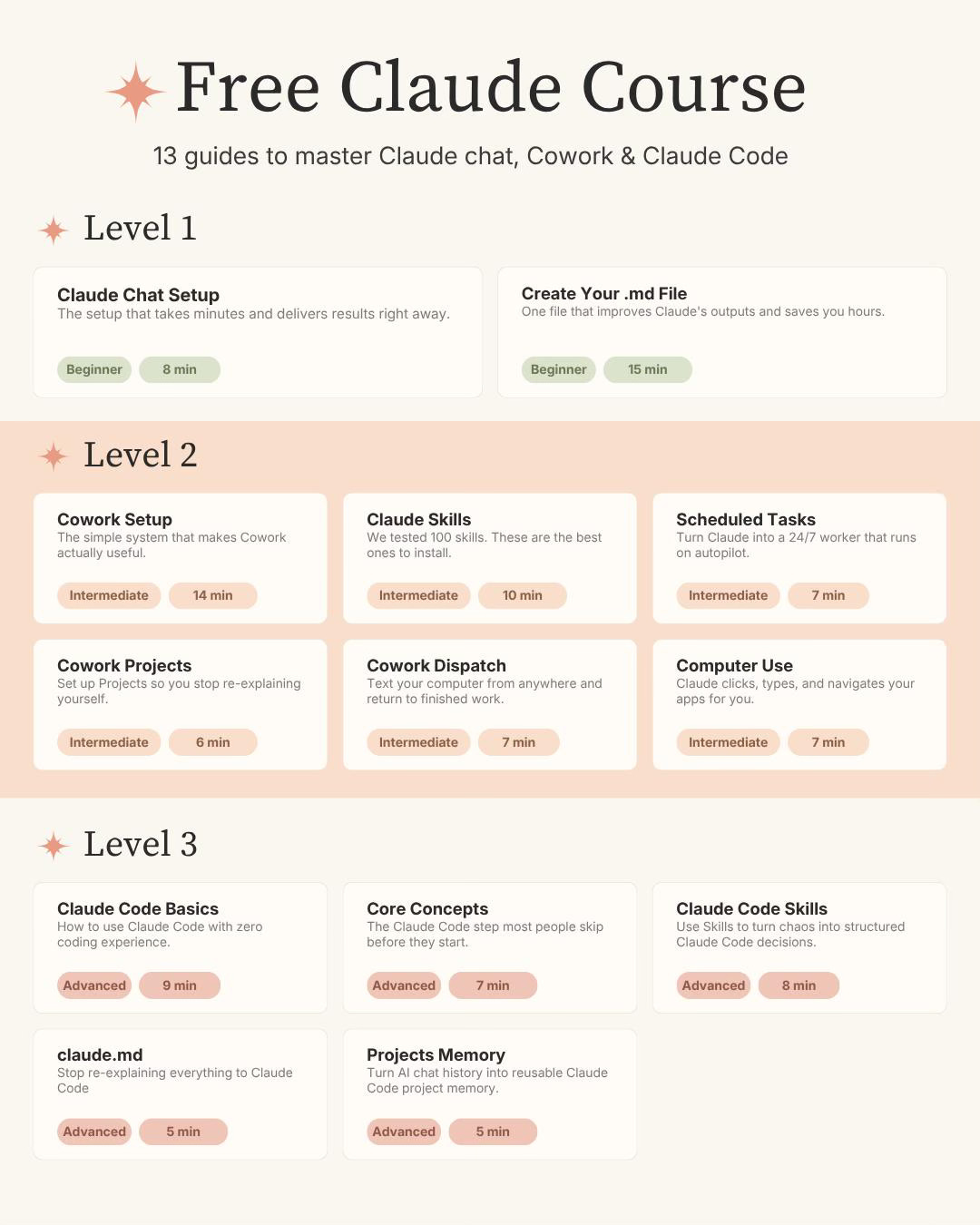 |
Here’s what the levels are about:
Level 1: Claude chat
This is the regular Claude you talk to, the one that looks a lot like ChatGPT.
Most people stop here and never get past the chatbot stage.
You’ll learn Claude features, how to set it up properly, and how to create a simple file that tells Claude who you are and how you work, so you stop re-explaining yourself every single time.
Once you do that, you’re already ahead of most users who just open a blank chat and start typing.
Level 2: Claude Cowork
This is where Claude stops talking and starts doing.
Cowork lives in the desktop app. The big difference: ChatGPT gives you text you have to copy and paste somewhere else, while Cowork creates the actual files for you (the document, the spreadsheet, the styling, all of it).
In level 2, you’ll learn how to set up Cowork, build your first skill, run tasks from your phone, turn Claude into something close to a 24/7 employee and more! For most non-technical people, this is the level that changes how you work.
Level 3: Claude Code
Claude Code is Claude Cowork on steroids.
They made Cowork to break the “I’m afraid of coding” barrier. But once you start hitting Cowork’s limits, Claude Code is how you break through them. And no, you don’t need to know how to code (the name scares people off, that’s all).
Level 3 covers why Claude Code is worth it, what to learn first, how skills work, claude.md and more. For this particular level, I haven’t covered everything yet, so you’ll need to take the Claude Code course below for a deep dive.
You don’t have to reach Level 3 to get a ton of value. But if you want to break Cowork’s limits, this is the door.
How to get my free Claude course
If you’re not a subscriber, click here to get my free Claude course (or leave your email below). After you subscribe, you’ll get a welcome email with the link to the course.
If you’re already a subscriber (and can’t find the welcome email), DM “free“ on Instagram or LinkedIn, and I’ll send you the link (you could leave a comment here, but I don’t get notifications, so I might lose your message)
P.S. Levels 1, 2, and 3 are free for everyone, but some guides I publish weekly are exclusive to paid subscribers. Support us by becoming a paid subscriber.
If you like video tutorials
Some people learn better by watching someone do it on screen.
Here are three free YouTube courses I’d actually recommend. Each one covers a different piece of the Claude puzzle.
Claude Cowork 60 Minute Masterclass (Sabrina Ramonov)
If you only watch one video, make it this one.
If you want one video to understand Cowork, this is it. Sabrina sets up the Claude desktop app from scratch, then runs five real use cases live: organizing a messy files folder, building an email assistant, creating on-brand content, and automating social media. It pairs perfectly with my Level 2 above.
Watch it, then go build something.
Key timestamps:
00:42 Download and install Claude Desktop + interface tour
02:10 Chat mode vs Cowork mode vs Claude Code (the difference that confuses everyone)
09:48 Skills explained (reusable AI playbooks)
19:00 Use case: organizing a messy local files folder