|
English | Español | አማርኛ | 中文 | 한국어 | Tiếng Việt | العربية | فارسی | اردو
Important Dates
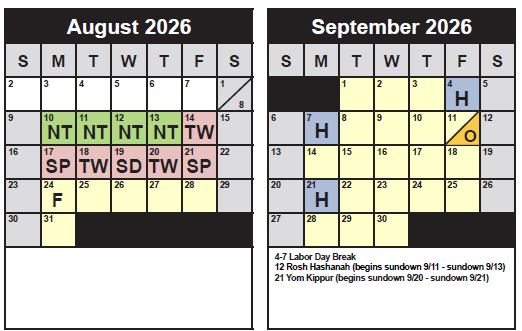
Friday, September 4 - Holiday, No School
Monday, September 7 - Labor Day Holiday, No School
Wednesday, September 9 - Back to School Night, 6pm - 8:15pm
Friday, September 11: Boosterthon Fun Run
Policy for All Grade Levels:
Cellphones, phone accessories, and all smart devices must be off and personally stored (i.e., backpacks) for the duration of the school day: bell to bell.
Smart devices include watches that serve a dual purpose, such as smart watches, as well as earbuds, headsets, smart glasses, and other items connected to the internet. This policy does not apply to school-issued devices.
https://www.fcps.edu/cellphone-policy
Join Chorus at GBW!
Hi GBW Families!
Does your 5th or 6th grade student love to sing? We would love to have them join Chorus!
In chorus, students will learn how to sing as an ensemble, develop their singing skills, and have fun learning how to sing in harmony with others. Chorus meets weekly during PAW time and will start the week of September 7th!
Chorus Sign-Up Form
If you have any questions, please reach out to Mrs. Hentz or Ms. Castro!
Fall Picture Day is coming!!
Thursday, September 17, 2026
Online purchasing is available and encouraged - it’s quick and easy! To place your order, click on the following link below and enter the ID:
https://my.lifetouch.com/mylifetouch/#/
Picture Day ID: EVTNT6Q6N
Picture packets must be purchased prior to picture day.
Paper order forms with the same purchasing information will also be coming home soon in your student(s) Thursday Folders.
If you would like to volunteer for Picture Day and receive free picture voucher(s), please sign up here!
|
For questions regarding how to place your picture order, or the Lifetouch website itself, contact Lifetouch at 1-800-736-4753. This number is also indicated at the bottom of the MyLifetouch.com home page.
|
New Student ID Cards Coming for Bus Riders This Fall
As part of the ongoing commitment to strengthening layered safety and security programs, FCPS will implement a new student ID system for students who ride our school buses.
The implementation of the student IDs is designed as an additional safety measure for our 130,000 FCPS students who ride the bus each day, ensuring they are on the right bus and that they get on and off at the correct bus stop, as well as making sure only authorized students are on our buses.
The IDs will be provided to students who ride the bus. Those students will be expected to tap on and tap off the bus. The student IDs do not track student movement. The only information available is when a student taps on or off a bus. Much like our Here Comes the Bus app, our new app will allow parents/guardians to track the progress of the school bus.
It is possible that the ID program will expand in the future to include uses such as library cards and meal payment. Learn more about the new transportation system and student ID cards.
Remember to Complete Permission Forms for School Resources
Families can now easily grant consent for their children to access a variety of school resources through the Parent Digital Consent system. This online tool can be accessed using your SIS ParentVUE account login. Parents can easily opt their child in or out of a variety of resources, including online educational tools, school counseling services, and more.
Visit the Parent Digital Consent webpage to access the system. Watch this video to see how to use the tool.
Opt In or Out to Student Devices Being Sent Home for Grades 1-6
New this year, families can opt out of having student laptops sent home with their student.
- If you do not want your student to bring their FCPS-issued device home, please toggle the Opt Out button to a check mark and confirm by pressing Save Selection.
- If you would like your student to bring their FCPS device home, no toggle action is needed. Confirm by pressing Save Selection.
Students whose families opt out will continue to have access to an FCPS-issued device during the school day. Please reach out to your student’s teacher to understand expectations for homework and any learning activities that may require access to technology outside of the school day.
Understanding Student Rights and Responsibilities Updates: New Universal Grade Matrices for Families
Families are encouraged to review the updated FCPS Student Rights and Responsibilities (SR&R) document, which explains expectations for student behavior and adult responses in order to enhance school safety and to create a fair, equitable, and supportive school environment.
Updates for the 2026-27 school year include new Universal Grade Matrices (UGMs). UGMs are charts that show behavior expectations and school responses by grade level (K-3, 4-8, and 9-12). These at-a-glance resources (in Appendix D of the SR&R) are designed to make it easier for parents and caregivers to understand how schools respond to different types of behavior concerns.
Visit the SR&R webpage for more information and to review additional updates to the SR&R for the 2026-27 school year.
New Requirement for Student Device Use During the School Day
Starting this school year, students must use FCPS-issued devices for school-related digital activities during the instructional day. This is in accordance with a new School Board requirement, approved on July 16, which states that students may not use personal electronic communication or computing devices, including personal laptops, tablets, smartwatches, smartphones, and similar devices.
Students may only use their personal device if it is required as part of a necessary accommodation in the students’ Individualized Education Program (IEP) or Section 504 Plan. A principal or the principal’s designee may approve a limited, course-specific exception for students enrolled in a specialized class when the curriculum requires a technology tool or software that isn’t available on a standard FCPS-issued device.
Families can help support this requirement by reminding students to bring their FCPS-issued device each day and use it for all school-related digital activities unless an approved exception applies.
|