|
English | Español | አማርኛ | 中文 | 한국어 | Tiếng Việt | العربية | فارسی | اردو
Dear Mantua families,
We had such a fabulous first week of school! It’s been wonderful to see students’ joyful faces as they settle into classroom routines and discover new ways of learning. Many students have shared with us that they are already making friends and finding favorite activities in their day!
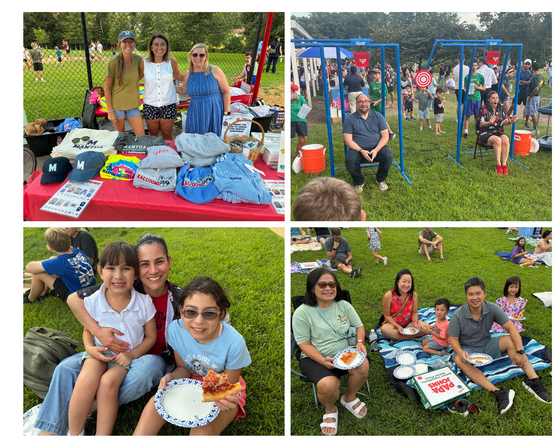
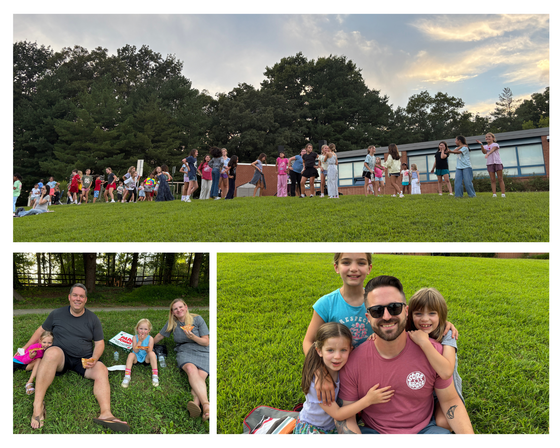
Thank you to the many families who came out to the PTA Ice Cream Social! We think we had one of the largest crowds ever, and we are so thankful the weather held so that we could enjoy being together. Thank you so much to our hard-working PTA volunteers for organizing and executing such a momentous event. A big shoutout to School Board Member Karl Frisch for joining me at the Splash Station! We had a blast—check out the photo below!
We always look forward to the food and fun, but also to connecting with families, and the PTA makes this all possible. Want to know how you can get involved? Please join us for the first PTA meeting of the year, September 10 at 5:30 p.m. in the library!
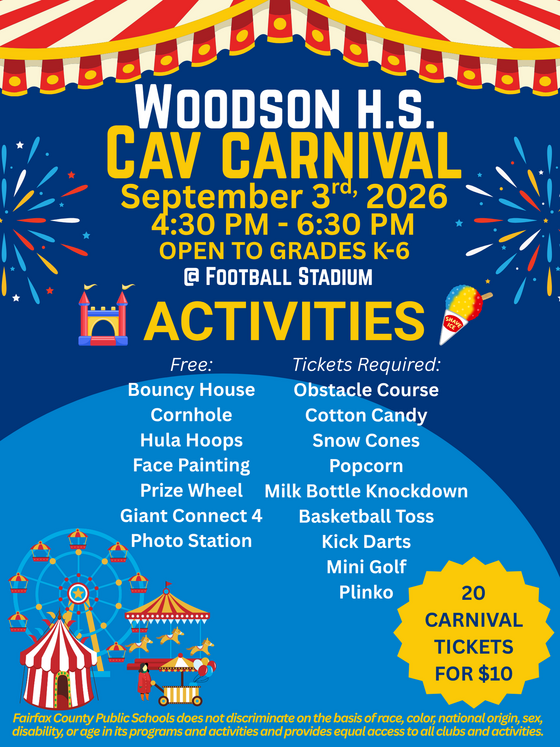
Mantua families are invited to the Woodson Feeder Cav Carnival! See details below. You won't want to miss this!
Join us for our first Movement Monday on September 14 at 8:30 a.m.! It is a great time for fresh air and fun, and it’s always a chance to make a new friend!
Take good care,
Ms. Shannon, Mrs. Vaughan, and Mrs. Maurer
September 3: Woodson HS Feeder Night from 4:30 to 6:30 p.m.
September 4-7: Student Holiday, Labor Day weekend, schools and offices closed
September 14: Mantua Movement Mondays begin, 8:30-9:05 a.m. at the track
September 16: Back to School Night for students and families, 6 to 7:30 p.m.
WOODSON Feeder Night and Cav Carnival
Come celebrate the new school year and Woodson Pyramid Night on Thursday, September 3rd at the Woodson Football Stadium! At our annual Cav Carnival we will have games, face painting, prizes, and finish with running of the field. Students K-6 get in free with a paying adult. Carnival Games start at 4:30pm, running of the field at 6:45. Our football game will start at 7:00pm against the Edison Eagles.
Bell Schedule
Mantua ES Bell Schedule is 9:20 AM - 4:05 PM
Kiss & Ride Reminder
Doors open and supervision begins at 9:05 AM. Please do not drop students off prior to this time. Arriving earlier does not allow students to enter the building and leaves them unsupervised for a period of time.
Visitors to Mantua
FCPS policy states that parents and guardians may not enter school buildings during the school day without first checking in at the main office. This important safety procedure helps us know who is in the building and ensures our students and staff remain safe.
To strengthen safety and security across all schools, FCPS is updating our visitor check-in procedures. Effective immediately, the "I Don’t Have An ID" option has been removed from all Raptor VMS self-service kiosks.
Moving forward, all visitors must present a valid, government-issued photo ID upon entry. Any visitor arriving without a valid ID will be directed and will not be permitted entry past the front office.
We strongly encourage all parents, guardians, and guests to bring a valid photo ID every time they visit our school. We appreciate your partnership and full cooperation as we update this process to ensure a secure environment for our students and staff.
Arrival & Dismissal Reminders
Safety is our priority. Please be patient as arrival and dismissal routines are established in these first weeks. We understand the hurried nature of mornings and evenings, but please drive slowly and safely through our parking lots and beyond. We have a single entrance and exit dedicated to Kiss and Ride, buses, and many walkers. If there is a line of cars waiting on Kirkwood Drive, do NOT pass the line. This presents a significant safety risk for students and families walking to and from school. The following notes help us to be safe and efficient. Please review the information below and reach out if you have any questions.
Arrival
We begin welcoming students at 9:05 AM. Please do not drop your child off early, as no adults supervise students before that time. If you arrive after 9:20 AM, please park your car and walk your student(s) to the front office through door #1.
While staff will be greeting children at Kiss & Ride until 9:20, please complete drop-off by 9:15 to ensure a prompt 9:20 start in the classroom. This allows your student time to walk to class and be in place by the time class begins. An essential part of our day in classrooms is our Morning Meeting. Being on time gives your child meaningful opportunities to build relationships with peers and staff and start the day on a positive note.
- Walkers: Staff will greet walkers at Door #1. We will have many staff members to help your child find their way to class during the first weeks of school.
- Bus Riders: Students are dismissed from their buses at 9:05 AM
- Kiss & Ride: Staff will greet Kiss & Ride students in the loop at the side entrance near door # 2. Please pull completely forward as staff directs you. Whenever possible, please have students sit on the passenger side of the vehicle. For safety reasons, students are not to exit on the driver's side of the vehicle. Staff will assist your child with exiting the car as needed. Please remain in your car.
Dismissal
-
Walkers will be dismissed from their classrooms. If you are meeting your walker at the end of the day, please meet them at Door #2. If you prefer to meet your child at a different exit, please discuss this arrangement with them beforehand.
-
Kiss & Ride students will report to room 254 daily. If parents/guardians arrive before dismissal, students will receive notification in their classrooms and report directly to Kiss & Ride at dismissal. As you approach the Kiss & Ride loop, please have your child’s name PUP placard visible. Plan to use these placards when you come through K&R. This is how we know that the person picking up is authorized by the parent/guardian. If you need additional placards throughout the year, please let us know.
-
Bus Riders will be dismissed from their classrooms. If you are meeting your student(s) at the bus stop, please arrive at the bus stop at least 5 minutes early. Kindergarten students who ride the bus in the afternoon must be met at the bus door and asked for by name by a parent, parent designee, guardian, or a responsible sibling who is a 7th grader or older. Kindergarten students who are not met will be returned to school.
PickUp Patrol (PUP)
Registration PickUp Patrol (PUP) emails were sent to all families. To ensure all students take the correct mode of transportation each day, parents and guardians must complete the PUP registration and update each child’s dismissal plan. Please visit the PUP website with any questions. If you need further assistance, please email Ms. Finaish at ffinaish@fcps.edu. If you have not yet created an account, please contact Ms. Finaish for a one-time link to set up your account. The link expires for security reasons, so once you receive it, please create the account immediately.
The student default plans you enter in PUP will become visible to the main office and to the individual teacher. If a student needs to leave school during the day, families will update their child's dismissal plan using the app. The app then communicates this information to the teacher and main office staff. At pick-up, the parent/guardian will come to the office to pick up the child.
Key Points to Remember
- All children must be signed out in the office (late arrivals, early dismissal, re-entry).
- A student CAN NOT be released to anyone except the parent/guardian or the emergency contact indicated on the emergency care card. Parents/Guardians can give consent to release their child to a different adult by making a change to their child's dismissal plan using the PUP app. Please know that if the person picking up a child is unknown to the staff, identification will be required.
- Changes to the default plan need to happen prior to 2 PM daily.
- Changes can be made in advance for planned changes to the student’s schedule.
- No dismissals can occur within 20 minutes of the end of the school day.
- As you use the application, if you have any questions, please check the PUP FAQ page. If you need further assistance, please reach out to Ms. Fadwa Finaish at ffinaish@fcps.edu or PickUp Patrol at support@pickuppatrol.net.
Attendance
We will also continue using PUP for absence reporting. If your child is either going to be absent for the entire day or late for any reason, please report the absence in PUP or email MantuaElem.Attendance@fcps.edu before 9:30 AM on the day of the absence.
- Reasons for Excused Absence and Tardy include: illness of the student, death in the family, doctor or dentist appointment, or absence on a day of observance.
Medication Forms & Drop Off
The Health Room continues to be open for drop-off of emergency and daily prescription medications. Medications may be dropped off after the start of school, M-F, 9 AM - 4 PM. All visitors are required to check in at the Main Office. All medications require a completed medication authorization.
A parent or designated adult must transport all prescription medications to school. Students are not allowed to bring in prescription medications. Prescription labels must include a description of the medication.
Labor Day Holiday
-
Friday, September 4, and Monday, September 7, are Labor Day holidays for all FCPS employees and students. Virginia legislation requires that schools opening prior to Labor Day must be closed the Friday immediately preceding Labor Day. We hope everyone takes the long weekend to celebrate a strong start to the school year and enjoy time with family and friends. See the complete school year calendar.
Student ID Cards for Mantua Elementary Bus Riders
We are distributing student ID cards to all our students who ride the school bus or use FCPS transportation services.
ID cards should be worn or attached to your child’s backpack and brought to the bus each day.
Students who have student ID cards should begin tapping as they board and exit the bus. Only students who use FCPS transportation services will be provided with a student ID card at this time.
We ask for your patience! Bus drivers are checking in students and may need some extra time at each bus stop while they do this. The transportation team is working hard to minimize any potential delays.
Learn more about the bus navigation and student ID cards.
Everything You Need to Do in SIS ParentVUE
Are you working your way through back-to-school forms and checklists? Make sure you have a SIS ParentVUE account for your family and log in to find important forms and updates.
- Be among the first to know about weather closings, bus delays, and other critical communications from your school and FCPS by providing your cell phone number and email in ParentVUE. To update your contact information in ParentVUE, click the “Online Packets” tab in the upper right of the screen, then click the “Online Verification/Update” icon.
- Submit daylong absences by clicking “Report Absence.”
If you do not have a ParentVUE account, contact your child’s school for an activation code and follow the directions on the SIS ParentVUE Account webpage.
Remember to Complete Permission Forms for School Resources
Families can now easily grant consent for their children to access a variety of school resources through the Parent Digital Consent system. This online tool can be accessed using your SIS ParentVUE account login. Parents can easily opt their child in or out of a variety of resources, including online educational tools, school counseling services, and more.
Visit the Parent Digital Consent webpage to access the system. Watch this video to see how to use the tool.
Opt In or Out to Student Devices Being Sent Home for Grades 1-6
New this year, families can opt out of having student laptops sent home with their student.
- If you do not want your student to bring their FCPS-issued device home, please toggle the Opt Out button to a check mark and confirm by pressing Save Selection.
- If you would like your student to bring their FCPS device home, no toggle action is needed. Confirm by pressing Save Selection.
Students whose families opt out will continue to have access to an FCPS-issued device during the school day. Please reach out to your student’s teacher to understand expectations for homework and any learning activities that may require access to technology outside of the school day.
Transportation Patience and Safety
Thank you for your patience as we all get used to new routines this school year. We appreciate our families following Kiss and Ride procedures and being patient while waiting for your child’s bus.
If your child’s bus is delayed, you may access the Bus Delay Notification System or use the Here Comes the Bus mobile app to receive the delayed bus report. Email messages will be sent to announce significant bus delays. Please contact the Transportation Office at 703-446-2050 with any additional questions. For concerns after 5:30 p.m., contact the FCPS Office of Safety and Security at 571-423-2000.
Have Children in Multiple FCPS Schools?
The FCPS mobile app lets you follow updates from all your children's schools in one place! Simply open the app, tap the teal pull-down menu, then tap the gear icon and select every school you want to follow. See this video of how to follow your school.
Find out about more features of the app. Download the app from the Apple App Store or Google Play Store.
Linda Shannon, Principal LCShannon@fcps.edu
Colleen Vaughan, Assistant Principal CAVaughan@fcps.edu
Michele Maurer, Assistant Principal, Mkmaurer@fcps.edu
Susan Palomino, Administrative/Finance Assistant SLPalomino@fcps.edu
Mergie Kakouris, Student Information Assistant, MBKakouris@fcps.edu
Fadwa Finaish, Office Assistant, FFinaish@fcps.edu
Judy Toy, Office Assistant, JPToy@fcps.edu
Avril Donat, Office & Library Assistant Andonat@fcps.edu
Jen Howard, Advanced Academics Resource Teacher, jhoward1@fcps.edu
Maria Regina Incer, Family Liaison, mrincernunez@fcps.edu
Quick Links
|