|
|
|
Hey,
|
|
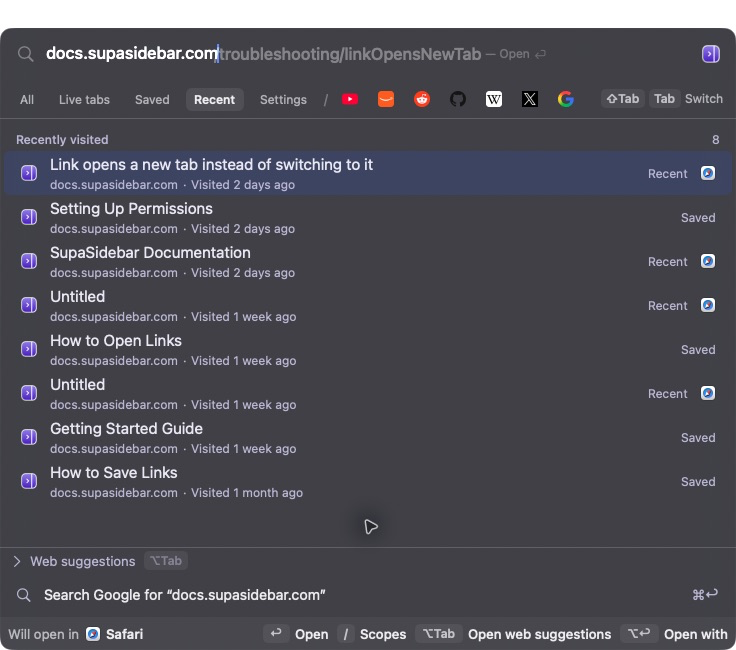
Forgot to save a page and can't remember which browser you opened it in? You can now search your browser history across all your browsers in SupaSidebar, including eligible visits from the last 30 days when the app wasn't running.
|
|
|
|
Search by page title or website name.
|
|
Privacy is top notch. Your imported history stays on your Mac. It's searched locally and isn't even added to your iCloud saved-link library.
|
|
To try it (available in v1.1.0 and later):
|
-
Open the Command Panel with ⌘⌃K.
|
-
Choose Recent and type a page title or website name.
|
-
Select a result and press Return.
|
|
You're in control in Preferences → Privacy & Browsers:
|
-
Choose which browsers can import history using their History checkbox.
|
-
Pause recording with Incognito Mode, or use Privacy for one browser.
|
-
Clear a browser's imported history from its ••• menu. Your saved links and the browser's own history stay intact.
|
|
|
|
- Kshetez (dev @supasidebar)
|
|
PS: Can't find a page? Reply and tell me which browser you're using.
|
|
|